How Caching Works
There are only two things that are hard in software development: cache invalidation and naming things.
-- Phil Karlton
A Caching Antidote
At the risk of paralleling a cooking recipe website, allow me to tell a little story before we get into things.
For someone who has been writing code for a decade now, caching still feels like a blind spot to me. Sure, I can tell you what it is and why it's useful. I can even mangle the old joke people make whenever it comes up (see the quote at the top of this post). But I don't feel I've worked with caching at enough depth to consider myself knowledgeable to a useful degree.
The first time I actually tried implementing a caching strategy on a project was a disaster. I was less than 3 months into a new position, sporting a "senior" title I did not feel I had at all earned. Our team was working to implement a process that allowed for a customer to interact with automated text messages to make or schedule payments. These text interactions had the following aspects and restrictions:
- Multi-step with branching condition logic that could reset/restart flow
- 'Conversations' could span multiple days (depending on customer response delay)
- Only one 'active' interaction for a given customer at a time.
Bullet points 1 and 3 in particular meant that we needed a fast, reliable way to track these conversations and be able to ensure the 'single active conversation per customer' requirement ('Restarting' a flow involved expiring the current active conversation and creating a new one).
We were using AWS Dynamodb to store the conversations, and one of the architects I looked up to and respected (I'll be honest, I was also quite intimidated by him) wanted to leverage DAX** to virtually remove the conversation lookup cost. While this sounded good initially, implementation led to headache after headache. Issues with negative caching and eventual consistency left us having to force consistent reads from the database in almost every scenario. This effectively made lookup times worse than not caching anything at all, as we were querying the db table through DAX instead of directly.
After many back and forth discussions with the architect, we eventually abandoned caching for the flow and the headaches disappeared. I learned several lessons from the process, but it left me unjustly jaded against caching. In reality, I had only experienced caching in an ill-fitting scenario.
** DAX stands for DynamoDBAccelerator, AWS's caching service for DynamoDB
Purpose of Caching
The premise of caching is simple. Rather than reading data from storage, which is expensive in terms of the time it takes, we can read it from memory. Data in memory has lower latency when accessing as well as faster speeds when reading/writing. How much faster, you ask? It can be measured in two ways. Latency, referring to how quickly it takes to access the data, and speed, referring to how much data can be transferred.
Latency comparisons break down like so:
- HDD: ~1-10 milliseconds
- SSD (including NVMeSSD): ~25-100 microseconds
- RAM: ~100 nanoseconds
In terms of speed, I found this chart below comparing persistent storage types
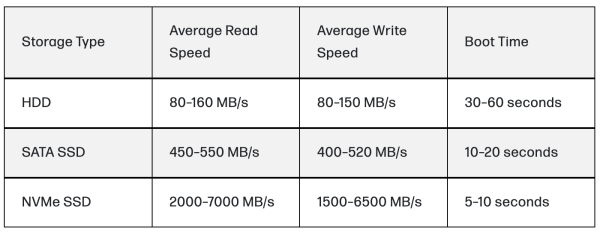
ORM Blog where I found this table
I was not able to find a small table comparing various types of RAM, but this wikipedia article shows a fairly exhaustive breakdown.
The takeaway is that memory beats out persistent storage solidly in both aspects. The difference between milliseconds, microseconds and nanoseconds may not be perceptible at low volume, but in large systems with hundreds or thousands of requests a second, the performance improvements become more apparent. A common example of this would be a service like Twitter/X, where popular tweets can get thousands of views at a time.
Of course, there is a reason everything is not stored in memory. It's more expensive, for one thing (now more than ever with the current AI boom). It's also volatile, meaning data does not persist when power is cut. As a result, there are many strategies that arise to get the most bang for your buck, which we will explore below.
Where the Cache is Located
Depending on the application, one or more caches may be used, and where the cache lives also
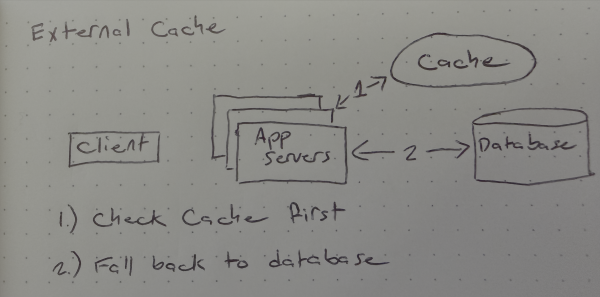
External Caching
This is the most common caching solution. In external caching, the cache is a separate service from your application layer. When a client makes a request, the application first checks the cache. If the item is found ( called a cache hit ), it is returned. If the item is not found ( cache miss ) the application fetches the item from the database, stores the item in the cache, and returns the response to the client. Depending on how the cache is deployed (external caches are often deployed 'globally') this cached information will now be available to all deployed applications.
Examples of external cache services: Redis, MemCache
In-Process Caching
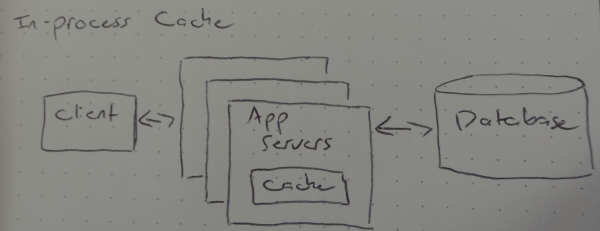
An in-process cache involves the cache living on the application itself. This is faster than external caching, as there is not the added network latency of a request to the cache. However, the cache being within the application itself means that it is scoped to that particular instance. In a deployment with multiple instances running, each would have their own, isolated cache. This could lead to overlap between caches, with multiple caches contain the same items, or that a client might request an item that is cached, but not on the instance handling their request. That being said, it can be an effective strategy if the data being frequently accessed is small or the application has available memory to spare.
Examples: config data, lookup tables, rate limiting data
Content Delivery Network (CDN)
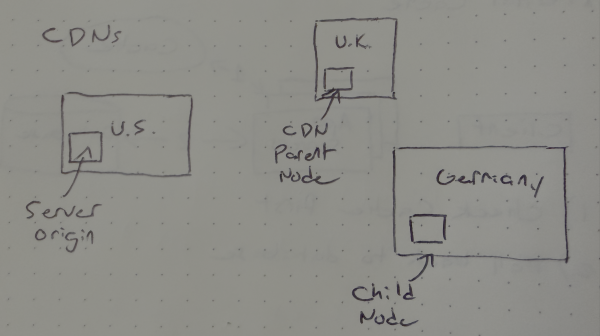
Content delivery networks are strategically placed servers across the physical region/regions a service operates. They allow for content to be cached on a server physically closer to the end user, reducing the latency in user requests. A typical setup might consist of a central origin server, a few parent/regional servers, and then multiple child/edge servers.
When a user requests content, the nearest edge server is checked first. If the content requested is cached, it is returned to the user. If not, the server will reach out to its parent node and see if the data is cached there, and so on until the origin server is reached or the content is found. Note that the CDN itself is responsible for reaching out in the event of a cache miss, not the client making the request. Once the data is retrieved, the data is cached in the participating servers that did not have it cached previously.
As a concrete example, imagine a user in Poland requesting content from an image hosting service. The service has its central server in California, a regional server in London, and an edge server in Germany.
user Arequestsimage 1. The request routes through the edge server, which has the image cached, so it is returned immediately.user Brequestsimage 2. The edge server does NOT have this cached, so it reaches out to the parent server in London, where it finds the image. The edge server cachesimage 2and returns ituser Crequestsimage 2. The edge server has it cached now, and immediately returns it
Examples: images, media assets, static content
Client-side caching
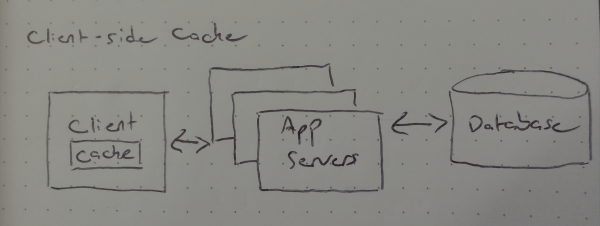
Finally, we have client-side caching. Client here typically refers to an end user device, but it could also refer to a client within the context of a library. This caching has the obvious benefit of requiring no network calls at all, and can make sense for client specific configs, data, etc (see below example list). The tradeoff for this is limited control from the application side. Client cached data can be difficult for various reasons, such as the client being disconnected, a browser tab remaining open for several hours/days, etc.
Examples: User-specific preferences (dark mode, page layout), Temporary cart for e-commerce, such as scenarios where a guest user is creating an account after adding items or a user is logging in after already shopping. \
Cache Architectures
Like cache types, the process by which a cache is written to can differ depending on the need.
Cache-aside
This is the most common architecture, and is employed often by external cache tools like Redis. The flow is simple:
- Application checks the cache
- If found, return item
- If not found, fetch item from database
- Cache found item and return to client
The nature of this process means that only data queried gets cached. The obvious benefit here is data not getting accessed will not clog up the cache. The downside is that the first request for an item will always require an extra trip to the database, as well as whenever the item is invalidated
Write-through
Caches using write-through write directly to the cache rather than the database. The cache itself handles the propagation to the database. Unlike cache-aside, this means that every item is cached at least once when it is created, meaning you may cache data that isn't read often or at all. It also introduces the problem of having to handle errors writing to the database and maintaining consistency between the cache and underlying database. Write-through caching is more suited for data that is written infrequently but read often.
Read-through
Read-through caching architecture is used by CDNs. When a client requests data, the request goes first to the cache. If the cache has the data, it is returned. If not, the cache reaches out to the database, fetches the data, stores and returns it. Similar to write-through, in this flow the application does not interact directly with the database.
Write-behind/Write-back
Similar to write-through caching, but in this structure the cache batches writes to the database asynchronously. This makes writes and reads fast, but does increase the risk for data loss if the cache crashes before writing to the database. This strategy is often used for analytics where some data loss is acceptable.
Cache Eviction
This is the tricky part of caching. Once a cache is filled, how are subsequent cached items handled? The application needs a strategy for determining which entries to kick. Luckily, the names of these evection policies are pretty descriptive of what they entail.
LRU (Least Recently Used)
As the name implies, this policy evicts the item that has been not been accessed for the longest time. Default policy by most systems.
LFU (Least Frequently Used)
Similar to LRU, except this policy evicts the item that has been accessed the least. The cache relies on a counter associated with each item to track access.
FIFO (First In, First Out)
Items are removed from the cache in the order they went in. This is simple to implement, but it is often not the correct solution as it rarely models real world access patterns.
TTL (Time to Live)
Cached items have a set expiration time given to them when the item is cached (e.g. 30 seconds, 5 minutes, 1 hour, etc.). Once the time has passed, the item is evicted. This is not an evection policy directly, and is often combined with another policy like LRU or LFU. TTLs are essential for data that must refresh, such as session tokens.
Common Cache Problems
Adding caching to a system improves performance when done correctly, but it also introduces some problems.
Cache Consistency
It is a well known concept in programming that duplicate code should be consolidated into a single function when possible. Multiple instances of code doing the same thing increases the chances a refactor misses one of the implementations, leading to inconsistent behavior. A similar problem exists with caching. Storing data in both the cache and database introduces the possibility of inconsistency- The item in the cache does not match the item in the database. This can stem from a few scenarios:
- A user's profile is cached. The user updates their profile, and the update is written directly to the database. Until the cached item is evicted, the cache will serve stale profile data.
- A write-behind cache receives a items to cache, but the batch flush to the database fails. The cache now has data not stored in the database until retry logic succeeds
To address these problems, the acceptable level of consistency needs to be determined. If the cached data must always be consistent, cache invalidation on writes to the database can be implemented. This process will evict a cached item if its underlying database value is updated, forcing the fresh item to be cached on the next read attempt.
If a small window of inconsistency is acceptable, implementing short TTLs on cached items can help ensure items in the cache are refreshed at the specified TTL interval
If stale data is not an issue for some time, refraining from over engineering a solution may be the correct approach.
Hot Keys
Cache entries that receive an exorbitant amount of hits are referred to as hot keys. If the level of access is too high, it can overload a cache node. To mitigate this, there are a few options.
- Replicate high access items across multiple cache nodes. Place a load balancer in front of the nodes to distribute traffic
- Implement an in-process cache for the most accessed items
- Rate limiting
Cache Stampede
When a cache entry expires, a subsequent request for the item in the database occurs. If this expiration happens on a popular entry receiving millions of hits, the result can be a massive surge of read requests hammering the database when the entry expires.
Solutions
- Request coalescing: Cache keeps track of entries that have requests against them, and only allows a single instance to trigger a call to the database. The other requests wait for that response, then it is returned to all incoming requests.
- Cache warming: Items that are about to expire are refreshed proactively. Note that this strategy only works for policies using TTL.
How to determine cache size/strategy
- Identify what problem is being solved for
- Database load alleviation
- Expensive computations
- Query latency
- Determine what data to cache
- Focus on data that is read often, updated infrequently
- Determine Architecture
- If you don't have a strong opinion, cache-aside
- For strong consistency, write-through
- For high volume, write-behind (accepting a level of eventual consistency)
- Determine Eviction Policy
- Add TTLs to ensure stale data is eventually flushed
Conclusion
The general concepts around caching are not too difficult to follow. As long as you have a solid understanding of your data and use cases, picking an effective caching strategy isn't a big deal. I think my personal struggle with caching is my distaste for stale data. While I understand it's not a problem in many cases, it drives me crazy on personal projects when know the data is stale. For example, this website itself. I'm hosting this on Vercel and have integrated with a few free tier services which provide plenty of bandwidth for the level of traffic it gets (namely, just me). To prevent excessive queries to my database and/or image hosting service, I've got Vercel caching the projects and blog pages for several days using ISR. I ended up implementing a cache invalidation flow on the admin side almost immediately so I can evict stale content when I make a change, which is happening more often than I anticipated.
With small scale projects, it's hard to justify the use of a cache, but I think I'd like to spin up a test project at some point that allows some interactive toggling between various modes of caching to demonstrate how they differ.
References
Comments
No comments yet.
Leave a comment